

Your tags keep multiplying, your GA4 reports no longer match your CRM, and no one is sure anymore who set up which event. A tagging plan puts the house back in order: a single document that lists what you measure, where, with which tool, and who owns it.
In this 2026 guide, we start from the definition, walk through the 5 steps to build one, share a ready-to-copy template, and cover the three topics where most plans stumble today: GA4, Consent Mode v2, and server-side.
A tagging plan, also called a tag plan or tracking plan, is the reference document that describes every event to collect on a website or app, and how each one is implemented.
In practice, it lists:
It translates business objectives into measurable events, and serves as a contract between the growth team, the product team, the data team, and GTM vendors.
A plan that is kept up to date solves three problems you find in almost every analytics stack.
A single document prevents duplicate events, inconsistent values, and untracked pages. Without a plan, GA4 and HubSpot drift apart, no one dares to shift media budget based on the numbers, and every behavioral analysis starts from an already leaky base.
A developer who needs to add an event knows where to look, how to name it, and whose sign-off to request. The average time to add a new event drops from two sprints to a few days.
Acquisition, conversion, and retention reports rely on the same events as internal management dashboards. Budget, product roadmap, and prospecting decisions all start from the same foundation.
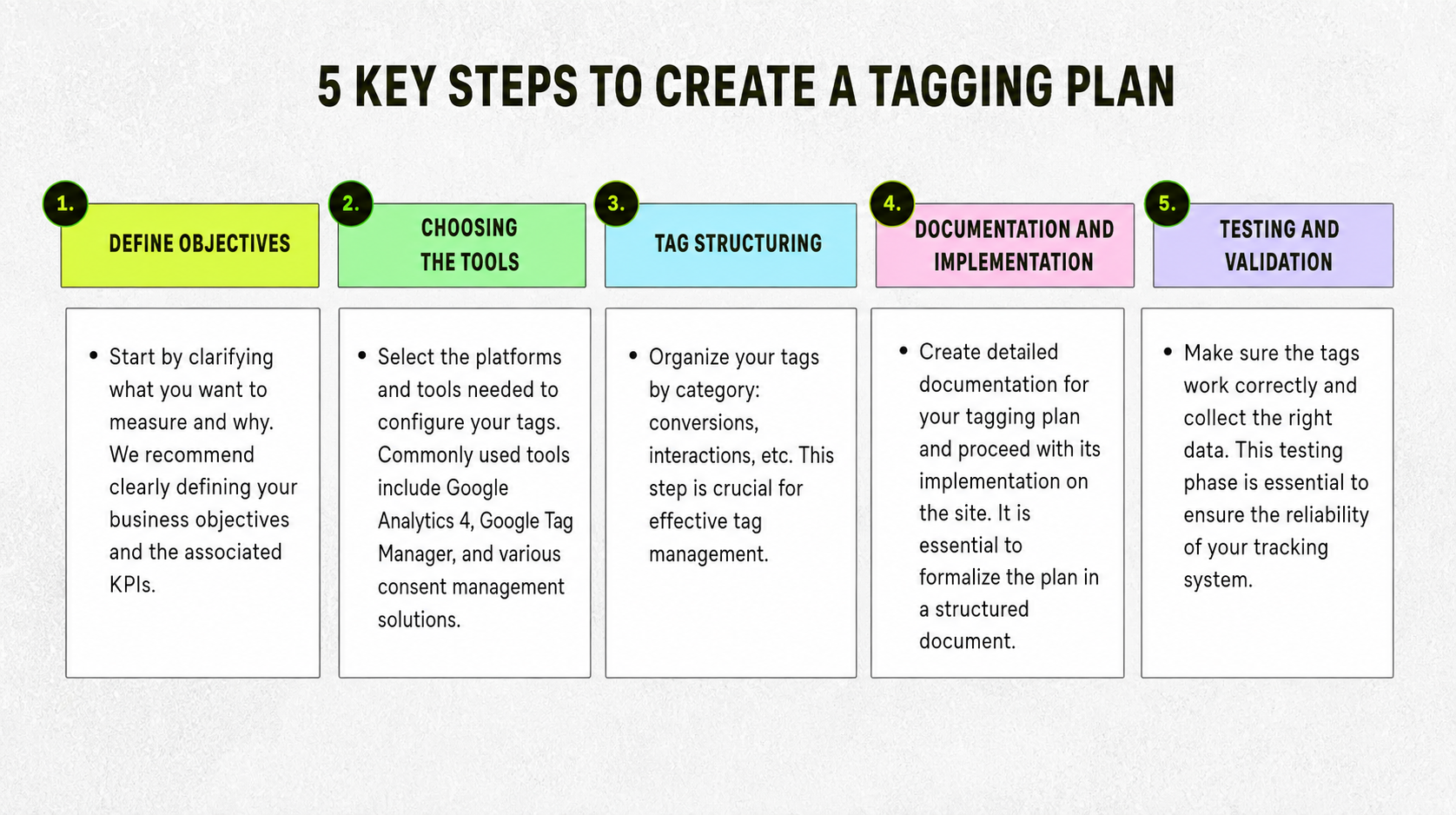
Five steps, in this order. Skipping the first one or mixing the last three is the most common way to end up with a plan no one uses.
Start from business objectives (revenue, pipeline, retention, NPS…) and drill down to the events that will measure them. A KPI without an event is a wish; an event without a KPI is noise.
Formalize that drill-down as a tree: objective, KPI, event, property. Our marketing metrics hierarchy resource walks through this logic with B2B and e-commerce examples.
Common pitfall: building the plan around what GA4 can do instead of what the business needs. You end up with a “complete” plan that is disconnected from real decisions.
A tagging plan lives inside an ecosystem. Decide early, and document:
Pick a strict naming convention and apply it across the team: snake_case for events and properties (sign_up, add_to_cart, demo_booked), past-tense verbs for actions, singular throughout. For GA4, reuse the recommended events whenever one applies (they unlock standard reports with zero configuration) and name the rest properly.
Group events by domain: acquisition, activation, conversion, retention, revenue. This structure lets you build reports per domain later, without re-reading every line of the plan.
The plan lives in one place, whether that is a Google Sheet, a Notion page, or an Airtable base. What matters: a single source, a change log, a named owner. In GTM, use workspaces and versions to trace who changed what and to roll back when needed.
At this stage, every line in the plan becomes a GTM task: tag, trigger, variable, test.
Before publishing, run each event through GTM Preview, Tag Assistant, and GA4 DebugView. Compare what is actually sent to what is expected: event name, properties, values, format, frequency. An event that fires twice is still better than a missing event, but neither beats a clean event.
After launch, schedule a quick monthly review: new events to add, dead events to retire, GA4-vs-CRM gaps to close. A plan that does not live is a plan you will eventually rewrite.

[rta-block=folder-cta][rta-title=h3]Want to learn more about your SEO potential?[rta-title=h3][rta-btn=regular href="/prendre-rendez-vous-typeform" target=_blank]Get a free audit[rta-btn=regular][rta-block=folder-cta]
Here is a minimal template you can paste straight into a Google Sheet, an Airtable, or a Notion base. It holds six columns that stay valid across tools and industries: each row describes an event and can be filtered by status, owner, or destination.
Columns: Event | Trigger | Properties | Tool | Owner | Status
A few example rows for a B2B SaaS site:
Add three more columns as soon as the team grows: date added, last QA date, GTM version number. They act as a safety net once the plan goes past 100 events.
GA4 enforces a strict event-based logic: everything is an event (including the page_view), each event carries up to 25 parameters, and only parameters declared as custom dimensions or custom metrics in the UI will appear in standard reports.
Three things to settle in the GA4 section of your plan:
Think about the data layer as well: if you push properties cleanly into window.dataLayer on every interaction, your GTM variables wire into it once, and your GA4 events stay consistent the day you add a Meta, LinkedIn, or TikTok pixel.
Since March 2024, Google has required Consent Mode v2 to keep using European data in Google Ads, GA4, and Performance Max. Your tagging plan must therefore record, for every event sent to a Google or advertising tool, the related consent status.
On the architecture side:
For each advertising tool (Meta Ads, LinkedIn Ads, TikTok Ads…), document the expected behavior without consent: fully blocked, replaced by a server-side anonymized version, or sent through the Conversions API with hashed data.
A server-side tagging plan is not a different plan: it is the same plan, executed by a GTM server (on Google Cloud Run, Stape, or your own infrastructure) instead of in the visitor’s browser.
What changes in practice:
For every event in the plan, record whether it fires client-side, server-side, or both (dual-send during migration). It is the column most teams forget, and it is the one that drives the whole stack architecture.
Two short examples, to show what a plan looks like in production.
An e-commerce plan starts with the purchase funnel: view_item, add_to_cart, begin_checkout, add_payment_info, purchase, all of them GA4 recommended events with their mandatory item structure. On top of that, you add engagement events that feed segmentation: view_item_list, select_promotion, add_to_wishlist, account creation, newsletter signup.
On the ads side: purchase and the key funnel steps also flow to Meta Ads through the Conversions API, to Google Ads through GA4 conversion import, and to TikTok Ads for younger brands. For each event, the plan specifies the taxonomy, the monetary value sent, the currency, and the platform-side attribution window.
A B2B SaaS does not steer purchases but a pipeline. The plan targets stages: demo_booked, demo_attended, trial_started, activation_completed, subscription_started, expansion_closed. Each event flows to GA4 (for acquisition analysis), to HubSpot (to feed the CRM and trigger Sales sequences), and, for the first three, to Meta Ads and LinkedIn Ads through the Conversions API.
In the plan, each SaaS event also carries an estimated value (deal_value_estimate) and an ICP segment. That value is what lets ad-network algorithms optimize for pipeline rather than raw leads: without it, LinkedIn Ads optimizes for any form filled.
GTM centralizes tag deployment, fires on data layer events, and versions changes cleanly. Use workspaces to isolate experiments and publish a dated version on every production release: the day a KPI drops, you will know which GTM version was live.
GA4 receives the vast majority of events. Take care of key events, audiences, and user properties: that is where your custom dimensions become usable in reports and in Looker Studio.
Didomi, Axeptio, OneTrust, or Cookiebot: pick one, configure Consent Mode v2 properly, and check that the four GCS signals flow into the data layer. On the data-protection compliance side, this is the minimum bar in 2026.
Deployed on Google Cloud Run or via Stape, a tag server has become the norm once media spend crosses roughly 50 k€ per month. It makes the data sent to ad networks more reliable, puts you back in control of what goes out, and prepares the gradual end of third-party cookies.
For stacks that outgrow GA4 (Segment, RudderStack, mParticle, or a BigQuery / Snowflake warehouse fed by a reverse-ETL), the tagging plan also serves as the data schema: the same events, the same properties, used everywhere. Looking to extend your stack beyond GA4 and GTM? Our marketing audit with 10 tools covers the main complementary ones.
A tagging plan is never built once and for all. The value comes from the discipline: a named owner, a monthly review, events retired as fast as they are added. That is the price for keeping a usable marketing data base, reports that do not lie, and ad algorithms that optimize for what actually matters.
To clean up an existing plan or build one from scratch, start from the template above and pressure-test each line against your business objectives. For an outside perspective, our growth resources and a free audit are there for that.

Content Marketing Manager at Bulldozer, she writes about content strategy, editorial systems and distribution.
Can't find what you're looking for ? Contact us here
jordan@bulldozer-collective.comGet access to playbooks and feedback from those who are shaping the next wave of marketing and AI.