
April 24, 2025
Bounce Rate: Definition, Calculation, Interpretation, and Optimization
Everything you need to know about bounce rate: how to calculate it, interpret it by context, and optimize it to improve user engagement on your site.
April 24, 2025
Everything you need to know about bounce rate: how to calculate it, interpret it by context, and optimize it to improve user engagement on your site.
Bounce rate. Every marketer knows the term — but few interpret it correctly. This metric measures the percentage of visitors who leave your page without exploring further. It can reveal an engagement problem, misaligned content, or a poorly optimized user experience. In this article, we break down what it actually means, how to read it in context, and — most importantly — how to improve it to hold attention and drive action.
The bounce rate is a performance indicator that measures visitor engagement on a web page. It represents the percentage of users who leave a site after viewing only one page, without any further interaction.
If a visitor lands on a page and leaves without clicking a link, navigating further, or signing up, their visit is counted as a bounce. This indicator is essential for evaluating the effectiveness of a website.
A high bounce rate can signal several problems: irrelevant content, a poor user experience, or poorly targeted traffic. Conversely, a low rate can signal good engagement — but it must always be interpreted in context and against the site's objectives.
Bounce rate can be analyzed at several levels:
A blog can naturally have a high bounce rate (visitors read an article and leave), while an e-commerce site with a high bounce rate on product pages almost certainly has a problem.
Tracking your bounce rate means understanding what works — and what doesn't. It helps to:
Bounce rate should always be analyzed alongside other metrics like time on page, conversion rate, and traffic source.
In short: if visitors aren't staying, you need to understand why — and adjust accordingly.
Bounce rate is calculated with the following formula:
🔢 Bounce rate formula:
(Number of single-page sessions / Total number of sessions) × 100
In plain terms: divide the number of visits where the user viewed only one page by the total number of visits, then multiply by 100 to get a percentage.
Example:
If a site receives 10,000 visits in a month and 4,000 of those visits were users who viewed only one page, then:
(4,000 / 10,000) × 100 = 40%
Bounce rate can be analyzed over different time periods depending on your objectives:
It's essential to compare this data with previous periods (prior month, same period last year) to correctly interpret variations.
Certain elements can skew your bounce rate analysis and should be excluded:
Effective filtering ensures a more reliable and relevant analysis of visitor behavior.
"A good bounce rate depends on the type of site: below 40% for a blog, between 20–50% for e-commerce, and up to 80% for a landing page."
A high bounce rate isn't always bad news, and a low rate isn't necessarily a success. Everything depends on context, page type, and time spent on the page.
Bounce rate varies by industry and site type:
The key is to compare your rate against your sector's benchmarks rather than chasing an "ideal" number.
Bounce rate is influenced by three major factors:
Bounce rate also varies by acquisition channel:
Bounce rate should always be analyzed alongside other indicators like time on page, conversion rate, and traffic source. A low rate alone is not enough to confirm a page is performing well.
[rta-block=folder-cta][rta-title=h3]Want to learn more about your data potential?[rta-title=h3][rta-btn=regular href="/prendre-rendez-vous-typeform" target=_blank]Get a free audit[rta-btn=regular][rta-block=folder-cta]
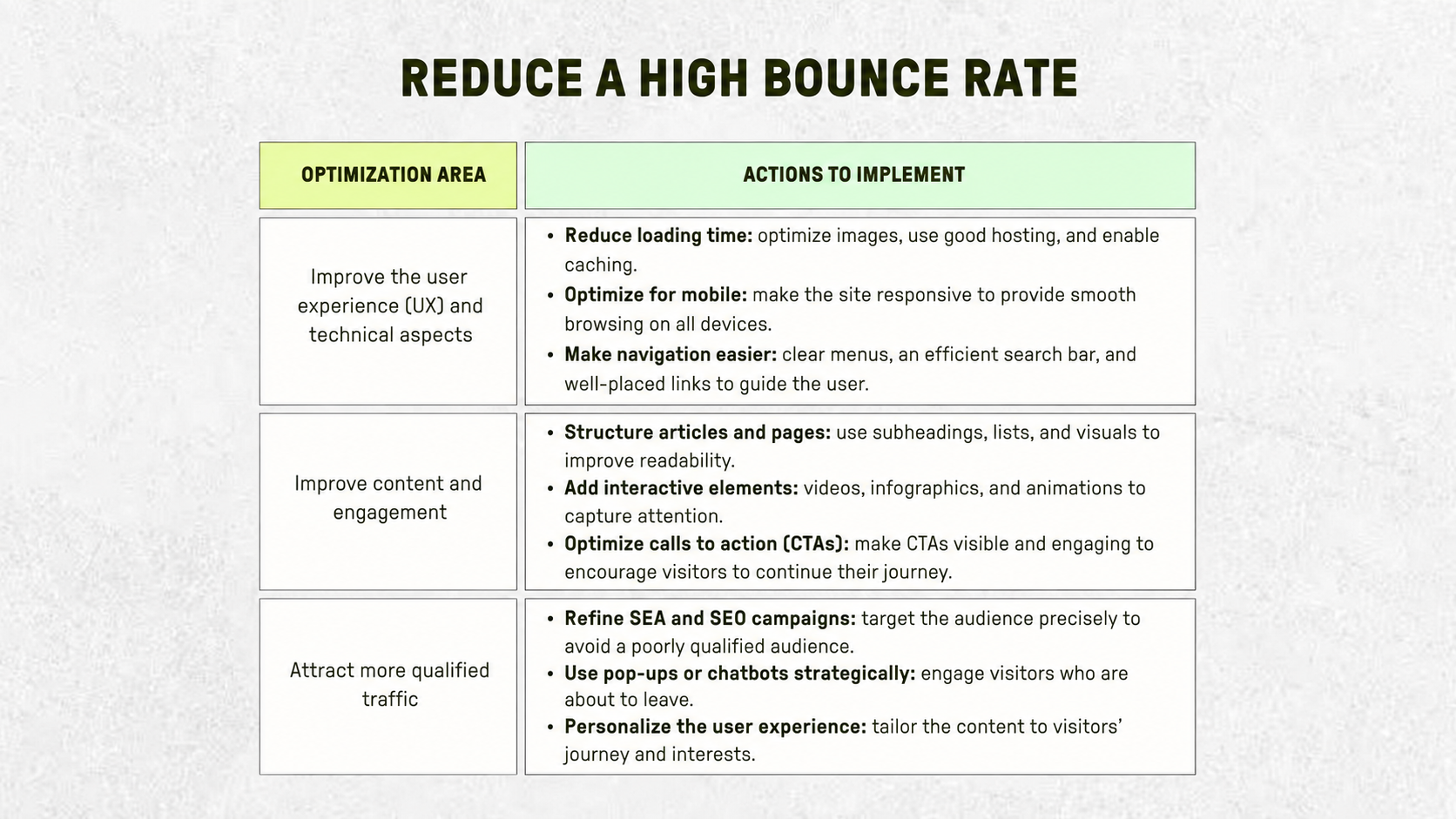
A high bounce rate isn't inevitable. With the right adjustments, you can encourage visitors to stay longer and interact more. The main levers: improve user experience, tighten content relevance for your target audience, and ensure your traffic acquisition is properly calibrated.
Bounce rate alone isn't enough to assess a site's performance. It should be analyzed alongside other indicators to get a fuller picture of visitor behavior.
To measure the impact of improvements, compare data before and after each change. Key areas to analyze:
Web analytics platforms offer several solutions for tracking and understanding bounce rate:
Regular monitoring and in-depth analysis help identify the true causes of a high bounce rate and enable data-driven decisions.
Bounce rate is a key indicator for understanding how visitors interact with a website. Rather than viewing it in isolation, it should be analyzed in the context of page type, traffic, and objectives. A high rate isn't always a problem — but when it reflects a lack of engagement, optimization is required.
Improving user experience, creating more engaging content, and attracting better-targeted traffic are the three major levers for reducing it. With regular review and strategic adjustments, it's possible to improve retention and overall site performance.
Lorem ipsum
.jpeg)
Writer at Bulldozer, he covers web scraping, UGC and no-code, mixing data, storytelling and SEO.
Can't find what you're looking for ? Contact us here
jordan@bulldozer-collective.comGet access to playbooks and feedback from those who are shaping the next wave of marketing and AI.