
A marketing audit is a structured review of your marketing strategy, channels and results, measured against your goals and your market. It shows what drives revenue, what costs money without returning any, and which three or four projects to start first.
In B2B, the audit answers one simple question: which marketing euro earns the most, and which earns nothing? Whether you're a French SMB or an international scale-up, the method is the same. Only the scope and the tools change.
This guide covers the step-by-step method, the 10 tools we use (several of them free), the most common mistakes, and a scoring grid to prioritise actions.
A marketing audit evaluates how well your marketing and commercial strategy works. It covers the marketing mix (product, price, distribution, promotion) and each of your acquisition channels.
It breaks down into four parts:
Depending on the question you start from, the audit focuses on one or more areas:
A communication audit is one part of a marketing audit. It evaluates what you say and how you say it: messages, tone, materials, press relations, consistency across channels.
A marketing audit goes further: it also measures what each action brings in (leads, opportunities, revenue) and questions your choices of target, offer and budget.
Two indicators now carry more weight in a website audit: user experience and bounce rate. A third one has joined them: visibility in AI answers, which standard SEO tools don't measure.
Consultancies use paid software to go deep. But several free tools are enough for a first diagnosis: Google Search Console, Google Analytics 4, Looker Studio or the free version of HubSpot.
A good audit tool ticks these six boxes:
Each analysis tool below meets a specific need of your marketing team. The summary at the end of the list shows which type of audit each one serves and whether a free version exists.
Primary use: Search Console shows how Google sees your site (queries, impressions, clicks, position, indexed and non-indexed pages). GA4 shows what visitors do once they arrive.
Strengths: both tools are free and connect to each other. Together they cover the full journey, from Google search to conversion.
Implementation: in GA4, set up your conversion events (form, meeting booked, demo). In Search Console, check the "Pages" report to find pages that aren't indexed.
Practical tip: in Search Console, filter queries in positions 4 to 20. Those are the pages easiest to push onto page one.
Primary use: auditing your organic search performance and analysing your competitors' strategies.
Strengths: these professional platforms show your rankings, your backlinks and the high-potential keywords you aren't working on yet.
Competitive analysis: these tools, not GA4, show which competitors capture traffic on your strategic keywords, and with which pages.
Practical tip: use the "Content Gap" feature to list the topics your competitors cover and you don't. To choose between the two, read our Ahrefs vs SEMrush comparison.
Primary use: analysing user experience on your website through heatmaps and session recordings.
Value added: these tools show why some pages don't convert, where GA4 only shows that they don't.
Implementation: install them on your key pages (home, offers, pricing, forms) to find friction points.
Recommendation: review rage clicks on mobile to detect usability problems.
Primary use: strategic and operational marketing in a single platform.
Strengths: the free version is enough to track the customer journey, from lead generation to signed deal.
Key features: customer relationship management, marketing automation, sales performance analysis.
Recommendation: use workflows to follow up with leads automatically and shorten time to conversion.
Primary use: building dashboards to evaluate performance across all your channels.
Strengths: these tools bring all your marketing data into one place so you can decide faster.
Setup: connect your social media, Google Ads and other channels for a unified view.
Free option: Looker Studio, Google's dashboard tool, connects natively to GA4, Search Console and Google Ads. See our Looker vs Looker Studio comparison.
Result: less time spent producing reports, and teams looking at the same numbers.
Primary use: understanding how your customers use your product or service.
Strengths: Mixpanel tracks events and behaviour, which helps you spot the key moments in the customer journey.
Practical application: analyse the drop-off steps in your conversion funnel.
Business value: know your customers better so you can adapt your offer.
Primary use: in-depth analysis of marketing performance with advanced visualisations.
Strengths: these platforms handle complex analyses on large data volumes.
Professional use: ideal for companies tracking performance across several markets or segments.
Recommendation: use them to produce the reports presented to the leadership team.
Primary use: auditing your social media presence and analysing engagement.
Strengths: brand mention tracking, competitive social media analysis, content scheduling.
Social strategy: adapt your content strategy to each network.
Performance measurement: evaluate the return on your social media activities.
Primary use: analysing the performance of your email campaigns and improving deliverability.
Features: A/B testing, advanced segmentation, recipient behaviour analysis.
Improvement: raise your email conversion rates and keep the customer relationship going.
Integration: connect them to your CRM to tie each campaign to the opportunities it generates.
Primary use: organising your marketing activities and tracking campaign results.
Strengths: these tools connect strategy and execution, and keep a record of every initiative.
Day-to-day use: plan campaigns, track budgets, evaluate results.
Collaboration: share the action plan that comes out of the audit between marketing and sales teams.
[rta-block=folder-cta][rta-title=h3]Want to find out where your growth potential really sits?[rta-title=h3][rta-btn=regular href="/prendre-rendez-vous-typeform" target=_blank]Get a free audit[rta-btn=regular][rta-block=folder-cta]
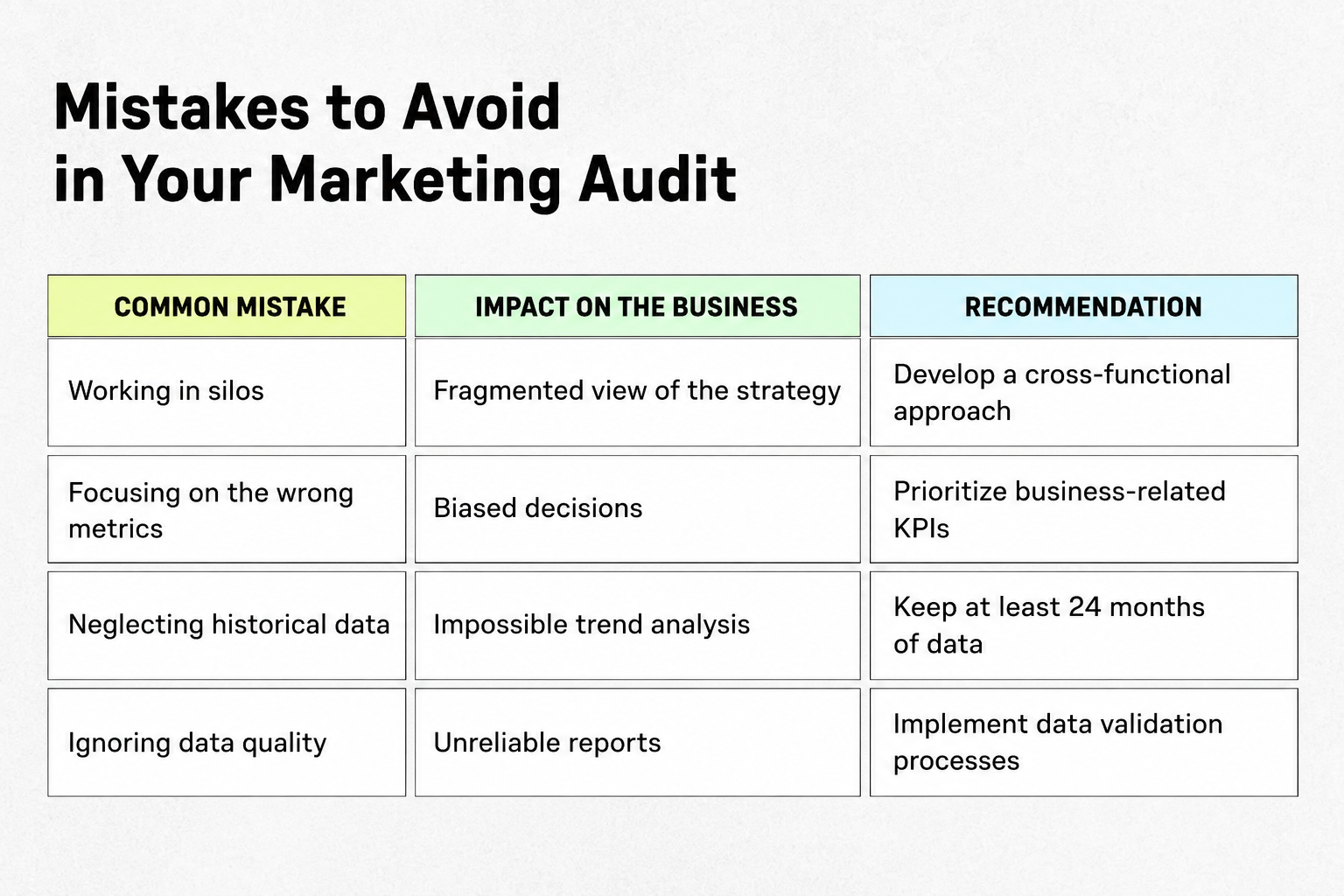
Most audits that lead nowhere share the same flaws. The six most common:
To turn the list of recommendations into an action plan, score each action from 1 to 3 on three criteria:
Add up the three scores. Actions scoring 8 or 9 go first; those at 5 or below wait. In a tie, impact decides.
A marketing audit isn't a one-off exercise. At Bulldozer, we recommend a full audit once a year and a lighter quarterly review focused on KPIs and progress on the action plan.
There is no standard frequency: a change of offer or market, or a sudden drop in traffic, justifies an audit right away.
A well-run audit lets you:
Every analysis should lead to testable hypotheses. An A/B testing culture lets you improve performance continuously.
Understanding how your channels work together helps you allocate budget better. In practice: record each lead's source in the CRM (UTM parameters and first-visit channel) so you know which channels generate opportunities, not just visits.
Tools like Zapier connect your software and automate repetitive tasks. Example: send every website form submission to the CRM with its source, then alert the relevant salesperson on Slack.
Define clear KPIs and measure performance regularly to quickly see what's working.
An audit without implementation is just a document. With the 10 tools in this guide, you have what you need to collect, understand and, above all, act on your marketing data.
The method comes down to four things: a numeric goal, reliable data, a prioritisation grid and regular follow-up. That's what separates a useful audit from one more report.
Book your free "Audit & Impact" diagnostic with a Bulldozer Collective consultant.
Because in 2026, the companies that grow are the ones that move from analysis to action.

Content Marketing Manager at Bulldozer, she writes about content strategy, editorial systems and distribution.
Can't find what you're looking for ? Contact us here
jordan@bulldozer-collective.comGet access to playbooks and feedback from those who are shaping the next wave of marketing and AI.