Publié par
curve whitecurve white
Killian Drecq
Rédacteur
Blog
/
CRO
/
Designing a SaaS Landing Page That Converts

Designing a SaaS Landing Page That Converts

Your SaaS solution is solid, but your landing page isn't driving action? It's often a matter of structure, design, and a poorly framed value proposition.

In this article, we walk you through optimizing your SaaS landing page: clean design, a call to action visible above the fold, credibility elements, live demos, and audience segmentation. We share best practices, common mistakes to avoid, and — most importantly — concrete levers to increase your conversion rate and turn every visitor into a potential user.

Ressource en lien
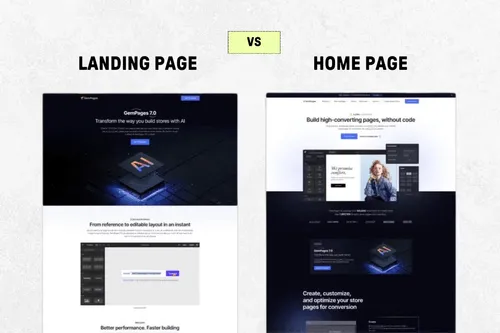
Landing Page vs Homepage
Dernière mise à jour :
17
/
06
/
2026

Why a SaaS Landing Page Can Transform Your Acquisition

A SaaS landing page isn't just a pretty showcase. It's a strategic tool designed to trigger a specific action: free trial sign-up, booking a meeting, requesting a demo. In short, it's where marketing turns into conversion.

And when it's well structured, it can make all the difference between a curious visitor and an active customer account.

What Is a SaaS Landing Page — and How Is It Different from a Homepage

A SaaS landing page is a section of your site entirely dedicated to a single objective. Unlike a general homepage or a classic "product" page, it doesn't scatter attention:

Page: Homepage
Objective: Navigation, broad discovery
Content: Menus, storytelling, multiple links

Page: Feature page
Objective: Explain a specific feature
Content: Product focus, technical detail

Page: SaaS Landing Page
Objective: Convert on a targeted action
Content: Headline, benefits, CTA, social proof

In a SaaS context, the landing page isn't just a marketing asset. It's the primary touchpoint in your acquisition campaigns (ads, SEO, email, affiliate...).

The Real Purpose of a SaaS Landing Page

A good SaaS landing page serves very concrete objectives:

  • Attract qualified leads through relevant content and a targeted form
  • Encourage contact or demo requests by reassuring prospects about the benefits of your solution
  • Clearly showcase your SaaS offering, with differentiating elements
  • Match a specific search intent, aligned with high-potential SEO queries

Some typical use cases:

Use case: Product launch
Main objective: Generate a spike in interest
Example: New AI feature

Use case: Post-ad page
Main objective: Maximize acquisition ROI
Example: Google Ads campaign on "simple CRM tool"

Use case: Competitor landing
Main objective: Capture comparison searches
Example: "Hotjar alternative" or "Miro vs Figma"

Do You Need Multiple Landing Pages? (Spoiler: Yes, and Here's Why)

A common mistake: trying to do everything with a single landing page. Bad idea. To be effective, your page needs to speak to a specific audience, in a specific context, with a calibrated message.

Creating multiple variants lets you:

  • Segment by channel: a different tone for SEO, Ads, LinkedIn, or retargeting
  • Adapt to each persona: CTO vs. marketing manager = different expectations, language, and pain points
  • Boost your Quality Score in paid: by aligning keyword / ad / landing page, you lower your CPC

A good rule: 1 page = 1 promise = 1 audience = 1 CTA.

And if you want to go further: test. Landing page A oriented toward "free trial," page B toward "book a meeting"... A/B testing is king in SaaS.

The Foundations of a SaaS Landing Page That Gets Clicks

A Tried-and-Tested Base Structure

There's no magic formula, but certain structures work particularly well in SaaS. Why? Because they maximize readability, prioritize information, and guide the user toward action.

Base checklist:

  1. An ultra-clear, benefit-driven headline
    • You're not selling a feature, you're selling a transformation.
    • E.g.: "Centralize your team projects in one click" > more effective than "Project management software".
  2. A differentiating subtitle
    • This is the perfect place to mention:
      • attractive pricing ("free up to 5 users")
      • ease of use ("zero technical onboarding")
      • key integrations ("integrates with Slack, Notion, Zapier…")
  3. A CTA visible above the fold (no scroll required)
    • "Get started for free", "Book a demo", "Create my account"… your choice, but it must be:
      • Unique (avoid contradictory dual calls to action)
      • Visually prominent
      • Repeated at the bottom of the page

Visual Elements Never to Overlook

In SaaS, your visuals need to show rather than tell. Your tool is digital? Show it in action.

Here are the three essentials to include:

  • Clear, contextual product screenshots
    • Not just a raw screenshot: show what the tool does, in what situation, with minimal annotation.
  • Video demo or quick animation
    • A short video (30 to 90 sec) is worth a thousand slides.
    • The goal: let users feel what it's actually like to use the product.
    • Bonus: the ability to track clicks and qualify leads based on viewing behavior.
  • Client logos & trust badges
    • Add logos of your flagship clients or tech partners.
    • Add platform "badges" (e.g.: "Most loved product on G2" or "App Store 4.9/5").

Reassure & Convince: Social Proof

In an ultra-competitive landscape, reassurance is key. Nobody will take your word for it: your customers need to speak for you.

Here are the formats that work best:

User testimonials

  • Ideal format: first name + last name + role + photo + short quote.

Example:

🗣️

"We cut our customer request management time in half."

— Sarah, Customer Success Manager at Acme

  • Aggregated ratings from third-party platforms

Trustpilot, G2, Capterra, AppSumo, Chrome Web Store… Ratings must be real and verifiable.

  • Lightning case studies
    • Ultra-concise (150 words max)
    • Goal: before / after, concrete results, quote
    • E.g.: "+38% qualified leads in 30 days"

Tip: place social proof right after the value proposition, and right before each CTA. That's where it has the most impact.

Adding a Twist to Stand Out

Today, users have seen dozens of SaaS landing pages. To capture their attention and maximize conversions, you need to differentiate smartly. Not by adding noise, but by creating a clear, engaging, contextual experience. Here are the "twists" that really make the difference in 2025.

SaaS Landing Page Trends You Can't Miss This Year

Some UX mechanics have become standards among the best-performing SaaS products. They combine interactivity, reassurance, and journey fluidity.

1. Interactive scenarios & product tours

Instead of simple descriptive text, offer a guided experience.

Examples:

  • Muzzle directly shows the embarrassing notifications its app blocks.
  • Linear immerses you in the product interface the moment you land.

Benefits:

  • Immediate engagement
  • Concrete visualization of value
  • Impact on product recall

2. Built-in comparison table (vs. competitor)

  • Build a simple, honest comparison table without directly attacking competitors.
  • Ideal if you're a challenger or an innovative alternative.

Effective format:

Feature: French language support
Your SaaS:
Competitor A:

Feature: Open API
Your SaaS:
Competitor A:

Feature: Monthly price
Your SaaS: €19/month
Competitor A: €49/month

Pro tip: place a CTA right below the table: "Try free for 14 days"

3. Dual user journey

Not everyone is ready to test right away.

Offer two clear paths:

  • "Try for free in 1 click"
  • or "Talk to a product expert"

Example: Close CRM offers both options on the same landing page, without overwhelming visitors.

This adapts to the prospect's level of readiness: some want to explore on their own, others need to talk before committing.

Speak to the Right Person: Tailor Your Page to Each Profile

A generic landing page reaches everyone… so it reaches no one. The key in 2025 is fine-grained targeting, at every level: team, sector, company size.

1. Use cases by team

Adapt your message to the day-to-day realities of each team. Examples:

  • Marketing: "Plan your multi-channel campaigns without spreadsheets"
  • Sales: "Never lose a deal to poor follow-up again"
  • Customer Success: "Unify all your customer conversations in one place"

Suggested structure:

👉 A section "How our tool helps…"
+ 3 visual blocks: one per team
+ Contextual CTA below each block

2. Messages by company type

Don't talk to a startup the same way you'd talk to an SMB or an enterprise.

  • Startups: emphasize agility, flexible pricing, quick integration.
  • SMBs: stress reliability, human support, scalability.
  • Enterprise: talk security, multi-user management, advanced reporting.

You can create different landing page variants for each profile — or integrate dynamic content blocks using tools like Mutiny, Unless, or Webflow Logic.

Want to learn more about your CRO potential? 

Demander un audit gratuit
Carte ou profil utilisateur central mis en évidence, entouré d’autres profils en arrière-plan, suggérant une sélection ou une mise en avant d’un utilisateur.
bulldozer

High-Value Growth Optimizations

A high-performing landing page is good. But a landing page strategically designed to increase conversion rate is better. At Bulldozer, we go far beyond simple design: we think user experience, behavioral data, and complete workflow, from the first visit through to sign-up.

What We Add at Bulldozer (and What Makes the Difference)

We combine clean design, tracking tools, and digital marketing to optimize every step of the user journey. The goal is clear: convert as many visitors as possible into active customer accounts.

Here are the building blocks we systematically integrate:

  • Precise, actionable tracking
    • Meta pixels, GA4 tags, UTM tracking — everything is set up to track user behavior.
    • Heatmaps and scroll tracking show you where people click, drop off, or hesitate.
    • Result: you know what works and what needs optimization.
  • Native A/B Testing
    • We test everything: the headline, the main CTA button, the mobile layout, the images.
    • Goal: increase conversion rate by adjusting what works for the target audience.
  • Onboarding / pre-qualification tools
    • Smart contact form with progress bar
    • Quick quiz or interactive assistant to guide the user
    • Result: you get better-segmented leads already partially educated about your SaaS service

We never send a prospect to a "silent" page. Every click is an opportunity to personalize the funnel.

A High-Impact Bonus CTA

Not everyone is ready to buy. Sometimes you need to create a softer engagement hook. That's where a well-designed "bonus" can make all the difference.

Our favorite formats:

  • Downloadable template: quick, useful, positions your tool as the logical next step
  • Free mini-audit: ideal for analytics, SEO, HR management, or finance tools
  • Interactive simulator: perfect for dynamic pricing, ROI calculation, or scoring

And to facilitate immediate engagement:

  • Calendly embedded directly in the page
    • No friction, no redirect, no dead time
    • You capture the lead while they're hot

Funnel Consistency: Think Funnel > Page

A standalone landing page is no longer enough. It needs to fit into a smooth, global strategy. Here are the points we systematically synchronize:

  • CRM connection
    • Every lead enters HubSpot, Pipedrive, or Notion CRM
    • Source attribution, scoring, automated routing
  • Automated email sequences
    • Follow-up email → value content → meeting
    • Ability to segment based on page behavior (form, scroll, clicks)
  • Ads > Landing > Email alignment
    • The message must be consistent from keyword to nurturing sequence
    • Example: a Google ad for "freelance CRM" links to a page 100% tailored to independents, with a welcome email that confirms product-persona fit

The goal isn't just to convert more, but to build a funnel that turns every click into a measurable business opportunity.

What We Can Steal from the Best SaaS and Apply to Your Page

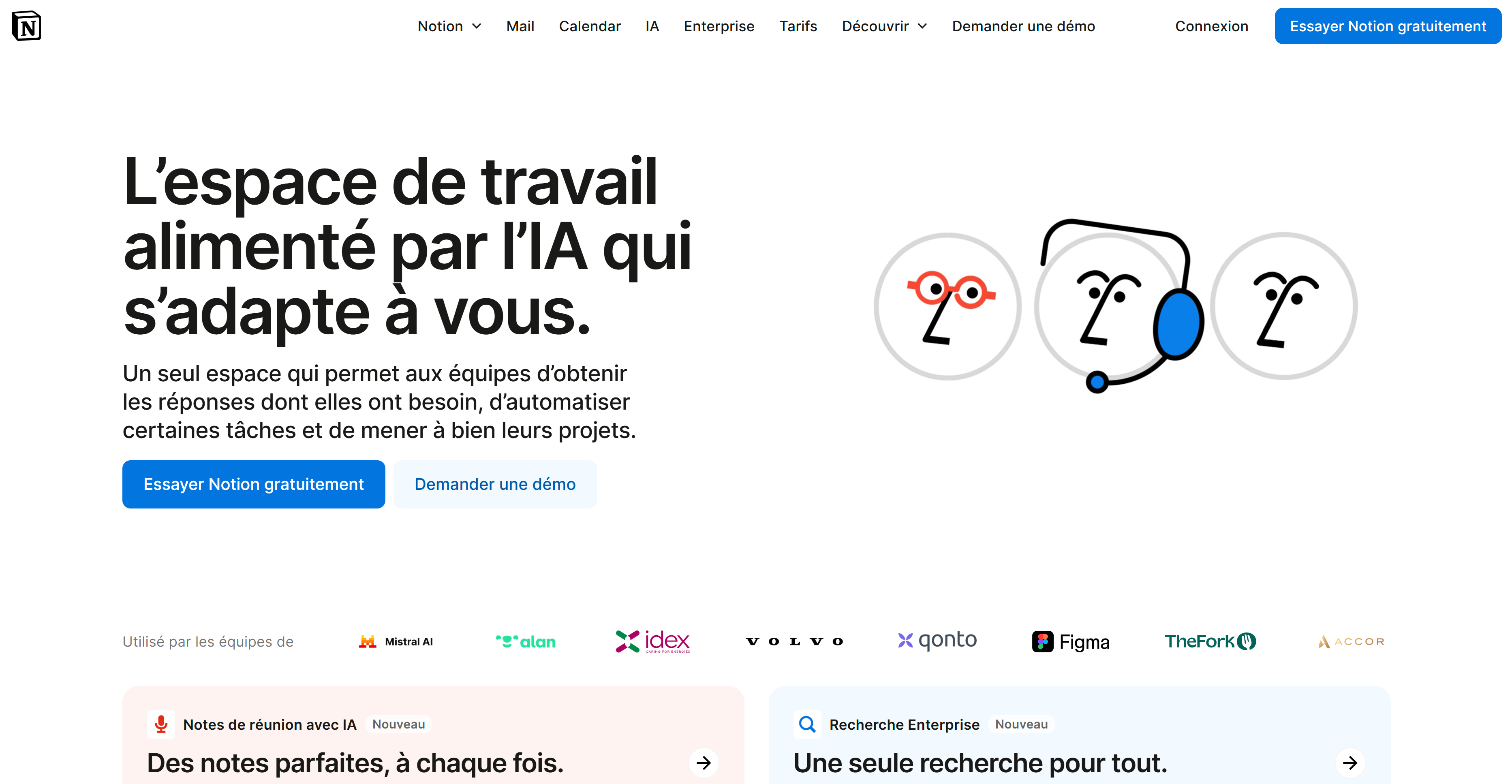
1. Notion – The Art of Visual Clarity

  • Page analyzed: notion.com/fr
  • What stands out:
    • A simple, direct headline: "The AI-powered workspace that adapts to you."
    • An interactive product demo just below the fold
    • Minimalist design, very mobile-first
    • Ultra-controlled visual hierarchy: zero reading friction

The takeaway: no need to say too much. The product experience speaks for itself, especially when it's well presented.
__wf_reserved_inherit

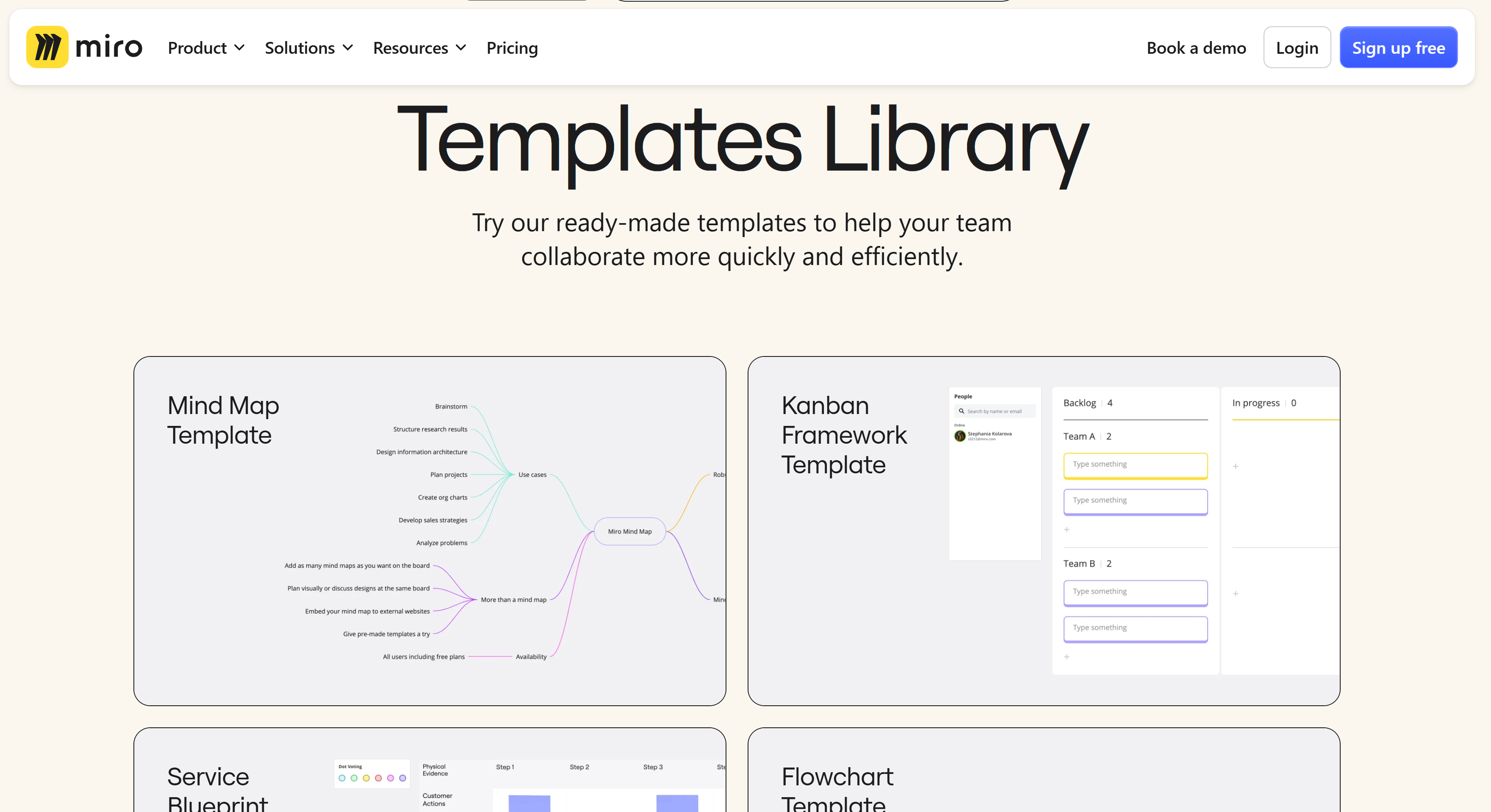
2. Miro – Reassurance at a Glance

  • Page analyzed: miro.com/templates
  • Highlights:
    • Visual storytelling with clear business use cases (sales, workshops, product)
    • Client logos visible immediately: Netflix, Deloitte, Cisco
    • Ready-to-use templates freely accessible
    • CTAs well integrated into each block

Why it works:

  • Social proof is omnipresent but fluid
  • You immediately understand how Miro adapts to my team
__wf_reserved_inherit

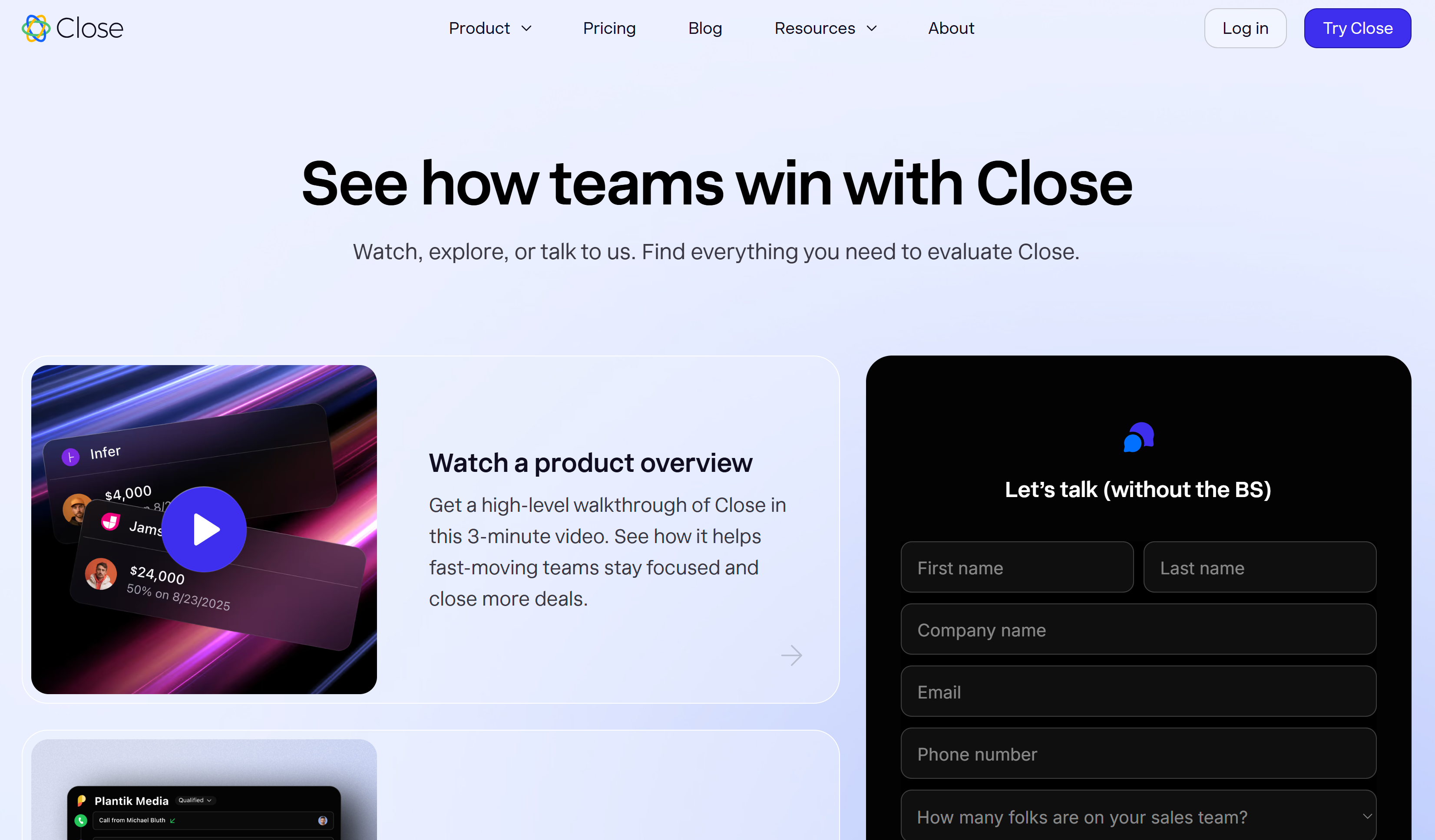
3. Close CRM – A Landing Page Designed as a Funnel

  • Page analyzed: close.com/demo
  • What stood out to us:
    • Two user journeys clearly displayed: "Book a demo" or "Watch video"
    • A very dense block structure, but still readable
    • A Calendly integration directly on the page
    • Sections tailored to each type of user (Sales, Startup, Manager)

Key takeaway: a landing page isn't just an entry point. It's already the beginning of the funnel.
__wf_reserved_inherit

Decoding Best Practices Through Examples

Every high-performing page actually follows the same structural principles. Here's a framework you can apply to your own project:

Element: Benefit-focused headline
Why it works? You capture in 3 seconds what the tool changes for me
Adapt for you? Yes, always

Element: Product demo visible quickly
Why it works? Skip the pitch, show the value directly
Adapt for you? Yes, especially for UI-driven tools

Element: High-contrast, recurring CTA
Why it works? Never leave the visitor without a clear option
Adapt for you? Yes, at least 2 per page

Element: Social proof (logos, ratings, testimonials)
Why it works? Immediately reassures on reliability
Adapt for you? Crucial if you're targeting B2B

Element: Contextualized sections
Why it works? You speak to each user type in their own language
Adapt for you? Yes, as soon as you have multiple personas

You have the keys. Ready to put them into action?

Reach out and let's co-build a SaaS landing page that actually converts.

FAQ

An effective landing page for a software as a service (SaaS) follows a simple, strategic logic: - Catchy headline + unique value proposition (clear in one sentence) - Product visual or demo (gif, short video) - CTA button visible right from the fold (first point of contact) - Credibility: testimonials, customer logos, ratings, badges - Advantages + benefits by persona / use case - Second CTA (at the bottom of the page) - FAQ/objections to reassure → Goal: an effective landing page that reduces the bounce rate and guides decision-making.

No-code / low-code tools to build landing pages: - Webflow, Framer (smooth, responsive design, design optimization) - Unbounce, GetLandy, SeedProd (A/B tests, mobile speed, form optimization) - Figma (mockups, design inspiration) - Carrd, Dorik (simple, budget-friendly landing pages) Tracking / measurement: GA4, Google Tag Manager, Hotjar, Clarity. SaaS stack: connect your SaaS tool (CRM, marketing automation) to track lead generation.

Yes, it has even become the norm. Most high-performing SaaS landing pages today are built without code, thanks to tools like Webflow, Framer, or Unbounce. You gain autonomy and speed of publishing, and you can test several variants without depending on a technical team. This is the foundation of an iterative approach in digital marketing.

Here are the most effective levers: - Display a single, clear objective (trial, demo, sign-up) - Optimize the mobile design (loading speed, readability) - Reduce the number of fields in the contact form - Add a short video (demo, before/after) - A/B test the headline / CTA / section order - Highlight the elements that matter most to the target audience - Place a visible UVP above the fold - Create a coherent workflow: from the ad through to the desired action - Align ad → landing page → thank you page

Yes. Tailoring the content to each specific segment (startup, SMB, large accounts, business functions, etc.) lets you: - better capture attention, - contextualize the features of your solution, - and optimize the use of each page as a strategic entry point into your sales funnel. The result: a better conversion rate and more qualified leads.

The UVP explains how your solution is different and what value it delivers right now. Place it at the very top, near the CTA (first point of contact), and repeat it at the bottom of the page.

- Keep only the essential fields (email, first name; phone if needed) - Use a two-step form (lead capture page) - Show micro-reassurance (“no credit card”, “cancel anytime”) - Test the field order and the button copy (“Create my account”, “Get the demo”)

Social media (organic + ads) is perfect for driving qualified traffic to a landing page: - vary the promise by channel (LinkedIn ≠ Instagram), - adapt visuals and CTA, - measure what gets clicked on a link and what converts. Use UTMs to connect each marketing campaign to its performance.

Look at the best SaaS examples (Notion, Shopify, Webflow): strong UVP, simple hero, CTA at the top + bottom of the page, social proof, scannable layout. Tip: build your own library of landing page examples in Figma to keep your design inspiration and your winning patterns in one place.

Define your KPIs: - conversion rate (trial, demo, purchase), - CTA button CTR, - scroll depth, bounce rate, - loading speed. Compare by source (social media, search engines) and landing page type, then iterate.

A primary CTA (e.g. “Free trial”) and, optionally, a softer secondary CTA (e.g. “Watch the demo”). Place the primary one at the top and bottom of the page. Keep the page straight to the point.

Pour aller plus loin

Conversion Rate Optimization (CRO)

Conversion Rate Optimization (CRO): The B2B Guide to Supercharge Your Conversions

CRO
Killian Drecq

12 No-Code Tools to Build and Automate Online Without Writing a Line of Code

Growth
CRO
CRM
Killian Drecq

Complete Guide to Creating an Effective Landing Page

CRO
Killian Drecq

Let's talk.

Full-funnel
500+ clients
300+ membres
Prendre un rdv stratégique